
This page provides guidance on using Python with the Apify API to obtain (scrape) a channel’s video data from YouTube.
THIS PAGE IS UNDER CONSTRUCTION
Prerequisites:
- An Apify account: https://console.apify.com/sign-up
- An authorized token to access the Apify API: https://console.apify.com/settings/integrations
- Python version 3 or later: https://www.python.org/downloads
- Apify client for Python: https://docs.apify.com/api/client/python.
- Include
from apify_client import ApifyClientAsyncin your code.
Contents:
How to scrape YouTube channel videos
This example uses the “Fast YouTube Channel Scraper” actor. Sometimes a channel will have date values in YouTube’s text data, but you need the full size actor, YouTube Channel Scraper, to get that field.
This task consists of three functions. The first calls the second, and the second calls the third.
First is to scrape the YouTube channel in Apify, second is to get that scrape from the last run and download the need data to a Json file, and third to process that data into a spreadsheet for review.
- scrape_channel – Asynchronous call to run the actor, configured with the channel’s URL and the maximum number of results set in the
settingsvariable. ThemaxResultssetting for scraping a channel is important to avoid using up your Apify usage plan too quickly. Specify 0 if you just need to scrape the channel’s metadata and not its videos. Calls get_last_scrape when completed.
- get_last_scrape – Asynchronous call to get the data obtained in the Actor’s last run, with Apify’s
last_runmethod, and downloads theid,title, anddurationproperty values for each video into a Json file. Calls process_scraped_channel when completed. - process_scraped_channel – Takes the Json data downloaded previously and creates a CSV file of the data you can import into a spreadsheet such as a Google sheet. The spreadsheet will have the fields required to meet the SoapData specifications in the GitHub repository, plus an additional column of links to the YouTube videos.
scrape_channel function
async def scrape_channel():

    try:

        # You can find your API token at https://console.apify.com/settings/integrations.
        # Assuems TOKEN is defiend elsewere
        apify_client = ApifyClientAsync(TOKEN)

        # Start an Actorh.
        actor_client = apify_client.actor('streamers/youtube-channel-scraper')

        # Define the input for the Actor.
        settings = {
        "maxResultStreams": 0,
        "maxResults": 4000,
        "maxResultsShorts": 0,
        "sortVideosBy": "NEWEST",
        "startUrls": [
            {
            "url": "https://www.youtube.com/@essmhtvny165es/videos",
            "method": "GET"
            }
        ]
        }

        print(f"Running {actor_client.resource_id} ...")

        call_result = await actor_client.call(run_input=settings)

        if call_result is None:
            print('Actor run failed.')
            return
        else:
            print("Scrape completed.")

        await get_last_scrape()


    except Exception as e:
        print(f"Error encountered: {e}")
get_last_scrape function
async def get_last_scrape():

    print("Getting last scrape ...")

    # Initialize the Apify client
    apify_client = ApifyClientAsync(token=TOKEN)
    actor_client = apify_client.actor('streamers/youtube-channel-scraper')
    run_client = actor_client.last_run()
    dataset_client = run_client.dataset()

    try:

        # Load items from last dataset run
        dataset_data = await dataset_client.list_items()

        channel_name = dataset_data.items[0].get("channelUsername")

        # Extract items from ListPage

        # Create json file to contain needed data
        # Extract individual records as a list of dictionaries
        last_chan_data = [
        {
            "id": item["id"],
            "title": item["title"],
            "duration": item["duration"]
        }
        for item in dataset_data.items
        ]

        # Save to a JSON file
        channel_json = f"{channel_name.lower()}.json"
        with open(channel_json, "w") as file:
            json.dump(last_chan_data, file, indent=4)

        print(f"Downloaded {channel_json}")

        process_scraped_channel(channel_name)

    except Exception as e:
        print(f"Error encountered: {e}")
process_scraped_channel function
def process_scraped_channel(channel_name):

    print("Processing channel ...")

    try:

        # List of dictionaries for scraped channel data
        channel_data = []

        # Get Json data saved previously in get_last_scrape function
        # and read into dictionaries
        channel_source = f"{channel_name.lower()}.json"
        with open(channel_source, 'r') as file:
            channel_data = json.load(file)

        # List of dictionaries for gathered data
        processed_channel_data = []

        for item in channel_data:

            record = {}
            yt_link = item["id"]
            # Construct the YouTube link
            record["YouTube"] = f"=HYPERLINK(\"https://youtu.be/{yt_link}\", \"link\")"
            record["id"] = item["id"]
            record["title"] = item["title"]
            # Use helper method to format hours:minutes:seconds
            duration_value = parse_youtube_duration(item["duration"])
            record["duration"] = str(duration_value)
            if duration_value < timedelta(seconds=30):
                record["category"] = "B"
            else:
                record["category"] = "A"

            title = record["title"].lower()
            # If 'Part' in title, get the number
            if " part " in title:
                match = re.search(r'part\s*(\d+)', title)
                if match:
                    record["part"] = match.group(1)
                    # print(part_number)  # Output: 2
            else:
                record["part"] = "1"
            record["total"] = "1"
            record["channel"] = channel_name.lower()
            # Use helper method to find dates in the title
            record["date"] = extract_date(title)
            # Use helper method to find soap names in the title
            soapcode = find_soap_in_title(title)
            if soapcode:
                record["soap"] = soapcode

            processed_channel_data.append(record)

        # Construct and save the CSV file
        fieldNames = ['YouTube', 'id', 'title', 'duration', 'soap', 'date', 'category', 'parentid', 'part', 'total', 'channel']
        channel_csv = f"{channel_name.lower()}.csv"

        with open(channel_csv, 'w') as csvfile:
                writer = csv.DictWriter(csvfile, fieldnames = fieldNames)
                writer.writeheader()
                writer.writerows(processed_channel_data)

        print(f"{channel_csv} saved. Operation complete.")


    except Exception as e:
        print(f"Error encountered: {e}")
Review and edit video data
After you import the CSV file into a spreadsheet, you can review the the data to remove non soaps and adjust titles and dates.
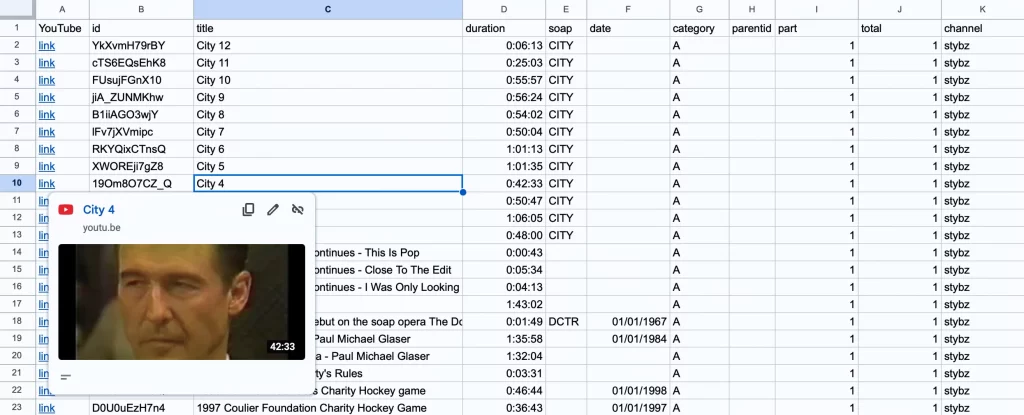
The code attempts to glean information from the title for these properties.
- The
dateproperty of when the soap episode aired. Calls the - The
soapproperty of the soap’s initialism. - The
partproperty, determines if the video is part of a series.
The duration property is formatted by the parse_youtube_duration helper method to specify hours, minutes, and seconds. If the duration is less than 30 seconds, the category property is set to B for promos, openings, and closings and would need to be verified; otherwise the vial is A.
How to create SoapJack data from a CSV file
If you want to contribute data to the SoapJack project in GitHub, the data must be formatted as described in the SoapJack Project.